Dance Pose Ideas for a Photo You Want to Animate
The best photo for a dance video is a plain one. Stand straight, face the camera, keep your whole body in frame and leave room around the arms. Then match the photo to a dance that fits it.
Pick a dance, upload one full-body photo, crop it to a vertical frame and make the video. It is usually ready in about 5 minutes as a 9:16 MP4 with no watermark.
Start with your photoTo make an AI dance video you need one photo and a dance. The photo should show one person, head to feet, facing the camera. A pet works too, with the whole animal in view and one of the dances marked for pets. The photo can be a JPG, PNG or HEIC.
The dance is either one of the AI dance templates or a short clip of your own. The rest takes a few clicks.
On the video maker, choose a dance. Each template shows a preview, so you can see the moves before you pick. To copy a routine of your own instead, choose Your own dance and upload an MP4 or MOV clip between 3 and 30 seconds long. Use a clip you filmed or have permission to use.
Choose your photo, then crop it to the vertical 9:16 frame. The video follows that frame, so keep the whole body inside it and leave some space around the arms. The crop must be at least 301 pixels wide.
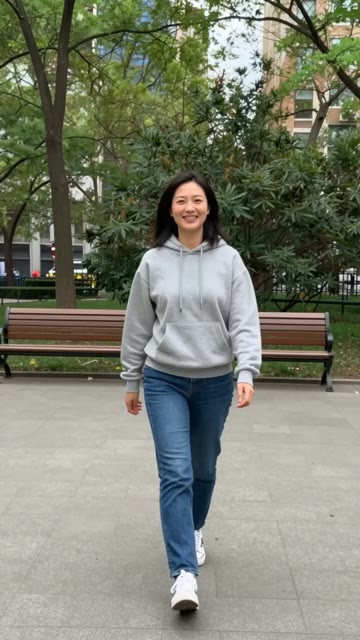
A full-body photo of one person facing the camera, and the Hip-hop Groove example made from it.
Tick the box that says the photo shows you, your pet, your child, or someone who agreed to this. It appears every time, because only photos you have permission to use can be turned into a video.
Press Make it dance. If you are not signed in yet, you sign in first and come back to the same photo and dance. New accounts get a free first video. After that, each video uses credits, shown before the video starts; the pricing page has the packs.
Once the video starts, you land on My videos. It is usually ready in about 5 minutes, and you can leave the page and check back later. From My videos you can watch it, download the MP4 or share it from your phone. Videos are kept for 30 days after they finish, so download anything you want to keep.
Watch the whole clip before you post it. The face, hands and feet should stay steady and in the frame. If something looks off, the photo is usually the cause: legs cut off, more than one person, a busy background or a pose with the arms tight to the body. The dance pose ideas guide shows what to change.
The best photo for a dance video is a plain one. Stand straight, face the camera, keep your whole body in frame and leave room around the arms. Then match the photo to a dance that fits it.
Most 2026 dance trends start with a song clip and a short routine anyone can copy in one take. Here is what has trended this year, and how to join one from a single photo.
Pick a dance, upload one photo, and get a vertical video in about 5 minutes. Not sure which dance? Browse the AI dance templates.
Make it dance