Dance Trends 2026: What People Dance To and How to Join In
Most 2026 dance trends start with a song clip and a short routine anyone can copy in one take. Here is what has trended this year, and how to join one from a single photo.
The best photo for a dance video is a plain one. Stand straight, face the camera, keep your whole body in frame and leave room around the arms. Then match the photo to a dance that fits it.
Make it dance with your photoThe best dance pose for a photo you want to animate is the plainest one: one person standing straight, facing the camera, with the whole body in view from head to feet. Let the arms hang loose and a little away from the body.
That sounds dull next to the usual dance photo ideas, and it is on purpose. The moves are mapped onto the body in your photo, so the dance needs to see the whole body. Arms, legs and feet that are cut off or hidden give it less to work with. The dance supplies the movement, so the photo only has to be a clear starting point.
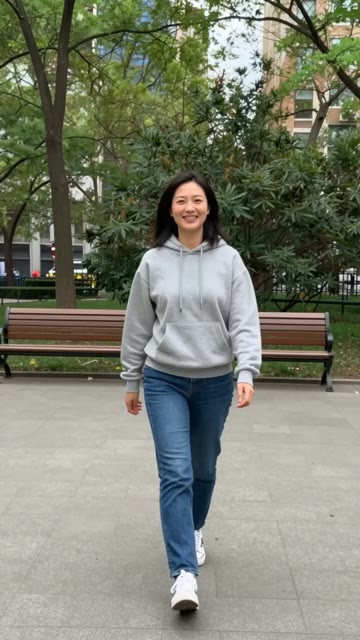
A plain standing photo in a park: one person, head to feet, facing the camera, arms loose at the sides.
Stand with your weight on both feet and face the camera square on. Have whoever takes the photo step back until your feet are in the frame with a little floor below them.
Most dances raise the arms, swing them out or bring the hands up to the face. When you crop the photo, keep the whole body inside the frame and leave some space around the arms. Arms pressed tight to the sides or crossed over the chest give those moves less to work with than arms hanging a little away from the body.
If the video is for a birthday, a graduation or a game day, wear the outfit in the photo: the dress, the gown, the jersey. Stand far enough back that the whole outfit is in frame, feet included.
A wall, a quiet street or an open park works better than a crowd. Daylight or a bright room helps. Strong backlight that turns you into a silhouette makes the body hard to pick out.
Every dance in the library is built for a full-body photo, but some ask more of it than others.
Not sure yet? Browse all the AI dance templates and watch each one before you pick.
Upload a JPG, PNG or HEIC photo. Before you make the video, you crop it to a vertical 9:16 frame, and the video follows that frame. Keep the whole body inside it, leave some space around the arms, and make the crop at least 301 pixels wide. A photo taken in portrait orientation, from a few steps back, usually needs the least cropping.
For a dog or a cat, the same idea holds: one animal, whole body in view, standing or sitting upright and facing the camera. The AI dog dancing and AI cat dancing pages list the dances that work with pet photos.
When the photo is ready, pick a dance and make your video. The step-by-step guide walks through the rest.
Most 2026 dance trends start with a song clip and a short routine anyone can copy in one take. Here is what has trended this year, and how to join one from a single photo.
Pick a dance, upload one full-body photo, crop it to a vertical frame and make the video. It is usually ready in about 5 minutes as a 9:16 MP4 with no watermark.
Pick a dance, upload one photo, and get a vertical video in about 5 minutes. Not sure which dance? Browse the AI dance templates.
Make it dance